
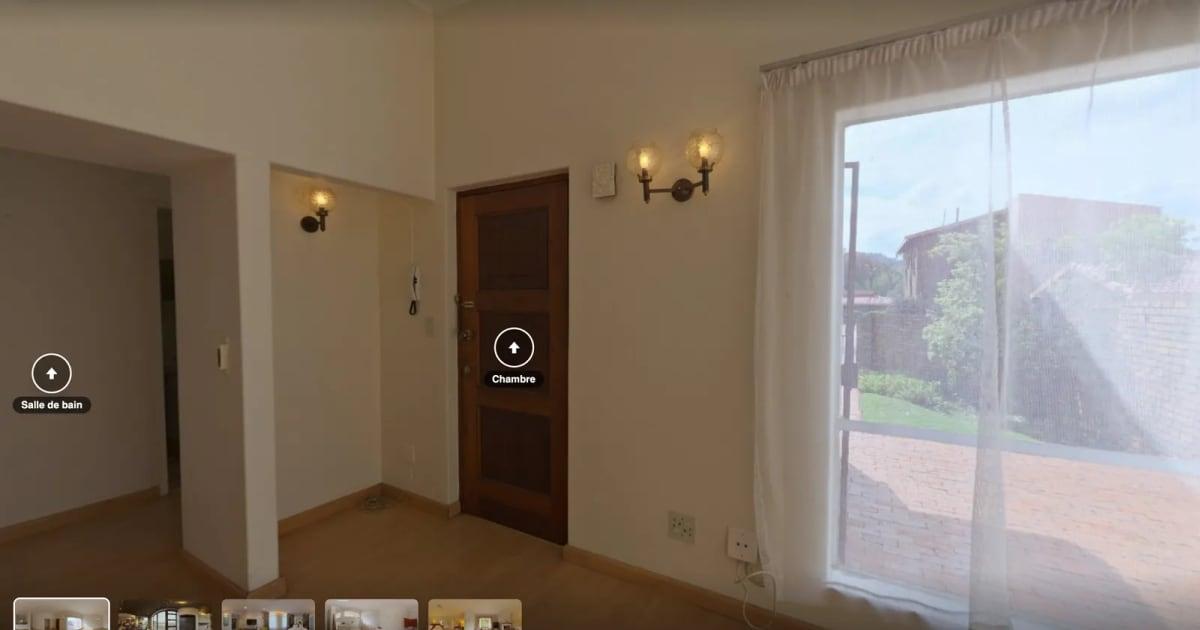
A buyer relocating from another state asks for more photos of the hallway, then the kitchen, then the view from the primary bedroom. With a virtual tour, they would already have the answer, and you would not lose an evening to back-and-forth texts.
Knowing how to make a virtual tour for real estate does not mean hiring a vendor or installing software. You need to pick the right format, get clean shots and know where to put the link. This tutorial follows the real order of the work, from the front door to the listing, using IACrea's real estate virtual tour tool. It also spells out what is free and what is not.
What you'll learn in this tutorial:
- Which format fits the property and your gear: 360° tour or interactive floor plan
- How to shoot a room in 360° without showing up in the picture
- The steps in IACrea, from uploading photos to the share link
- Where to put the link and the QR code so buyers actually use them
- The limits of "free," with no surprises
How to Make a Virtual Tour: 360° Tour or Interactive Floor Plan?
A real estate virtual tour lets buyers walk through a property online before they book a showing. It comes in two forms, which need different gear and different time on site.
The 360° virtual tour is a series of panoramic photos, one per room, linked together. The buyer stands in the middle of the living room, looks all around, then clicks the doorway to step into the bedroom. This is the format that conveys volume, light and atmosphere.
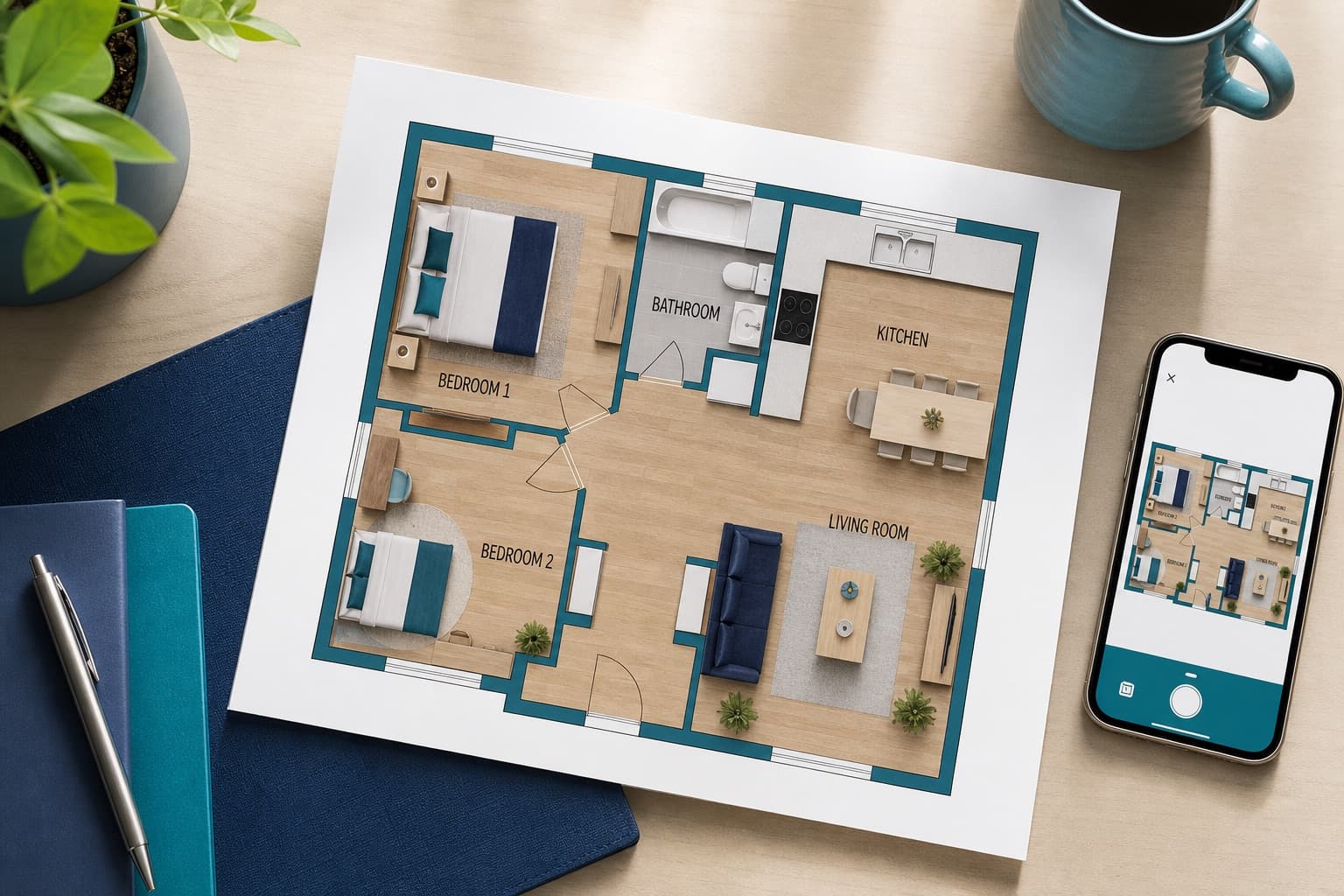
The interactive floor plan starts from the property's floor plan. Cameras are placed on it; the buyer clicks one and sees the photo taken from that spot, facing the right way. They instantly understand how the rooms connect, which photos alone never show.
| 360° tour | Interactive floor plan | |
|---|---|---|
| Gear | A 360 camera on a tripod | Your listing photos and the 2D floor plan |
| What buyers grasp best | Atmosphere, volume, light | The layout |
| Time on site | One shot per room | No extra trip |
| Cost in IACrea | Free during the launch period | No credits, with the 2D floor plan add-on |
Decide listing by listing. A character home or a large condo shines in 360°. A two-bedroom where the layout sells the place reads better on a plan. Nothing stops you from offering both for the same property. For a broader comparison with video, read 360° virtual tour vs. AI video.
The Gear: A 360 Camera, or the Photos You Already Have
For a 360° tour
You need a consumer 360 camera, such as a RICOH THETA or an Insta360, and a tripod. The camera captures the whole sphere in a single shot with two back-to-back lenses, then stitches the image.
The format that matters is the equirectangular photo. It is an image twice as wide as it is tall that "unfolds" the sphere, the way a world map unfolds the globe. Google requires the same format for 360 photos posted to Maps: an equirectangular panorama with a 2:1 aspect ratio. IACrea accepts JPEG, PNG or WebP files at least 2,048 pixels wide. Every common 360 camera exports in this format, usually well above that minimum.
Before you buy, check two things: the export resolution, and the camera's companion app, which should let you trigger the shot remotely from your phone. That is what keeps you out of every photo.
For an interactive floor plan
No 360 camera. You start from your listing photos and the property's floor plan. The plan is made with the IACrea app on iPhone: you walk through the home and the app draws it. On an iPhone Pro, the LiDAR scan also captures the measurements, in about five minutes; on other iPhones, the plan shows the shape and proportions of the rooms, without dimensions. You can also draw it in the floor plan editor. The tutorial create and edit a floor plan with IACrea covers both methods, and scanning a room with your iPhone explains the on-site capture.
Shooting 360 Photos, Room by Room
A 360° tour is only as good as its photos. The rules are simple, but a single mistake shows in every direction at once.
Where to put the camera
In the center of the room, on a tripod, at eye level. Too low and the buyer feels like they are touring on their knees; too high and the furniture flattens out. In an L-shaped room or a large great room, take two shots: the buyer will move from one to the other as they would between rooms.
Open every interior door before you start. They become the passages in the tour.
Staying out of the shot
A 360 camera sees everything, including the photographer. Trigger the shot from the camera's app on your phone while standing in the next room, door closed or around a corner. Failing that, use the self-timer. The tripod stays visible at the bottom of the image: that is normal, and it is the area the eye looks at least.
Lighting
Work with natural light: blinds and curtains open, ideally around midday for darker rooms. Avoid the hours when direct sun pours through a window and blows out part of the image. 360 cameras can soften the gap between a very bright window and a dark corner; if yours offers that setting, use it, it is a feature of the camera.
Declutter, and protect the sellers' privacy
In an occupied home, put away anything lying around. In 360° there is no angle that hides the laundry on the chair. Also remove family photos, mail, papers on a desk and anything that identifies the occupants. Strangers will view the tour. Get the seller's permission before you shoot, and show them the result before you publish.
An empty room looks smaller in 360°. IACrea's virtual staging can furnish an equirectangular 360° photo in the style you choose, with no reshoot. Like any edited image, it should be disclosed as virtually staged in the listing.
Building the 360° Tour in IACrea, Step by Step
Everything happens in the browser, from the property's page. A setup guide shows the next step at every moment.
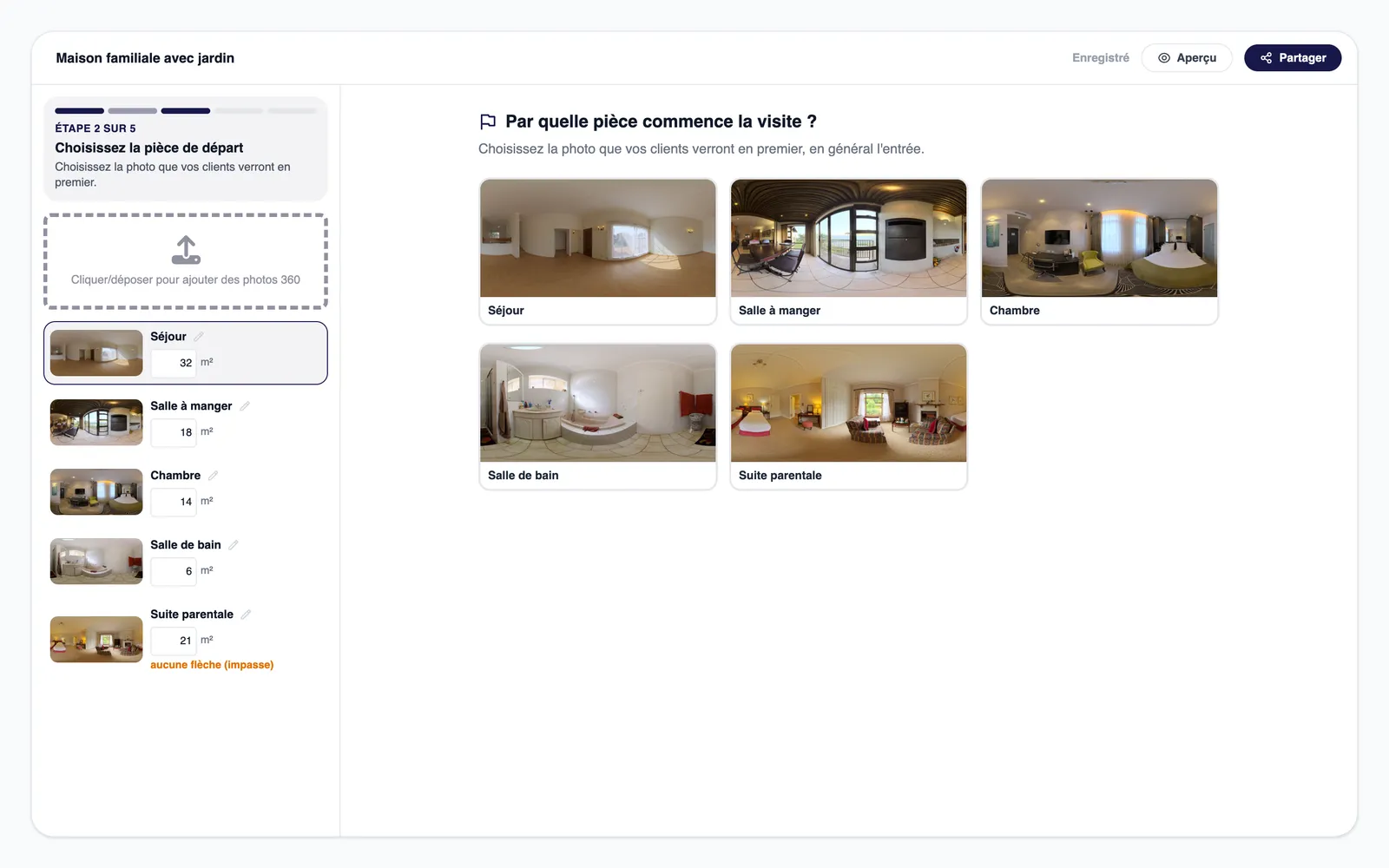
- Upload the photos. Drag the camera files into the editor. They are sorted in the order you shot them, which is why it pays to shoot in tour order. A tour can hold up to 60 rooms; beyond that, create one tour per floor.
- Pick the starting room. Usually the entry, or the living room if the entry has nothing to show.
- Link the rooms. Click a doorway, then pick from the list the room it leads to: the arrow is placed. The editor suggests the return arrow in the other direction.
- Name each room and enter its size in m². It shows on the thumbnails, so the buyer knows right away they are looking at a 118 sq ft (11 m²) bedroom, not a 150 sq ft one.
- Publish. The tour gets its share link, its QR code and its embed code.
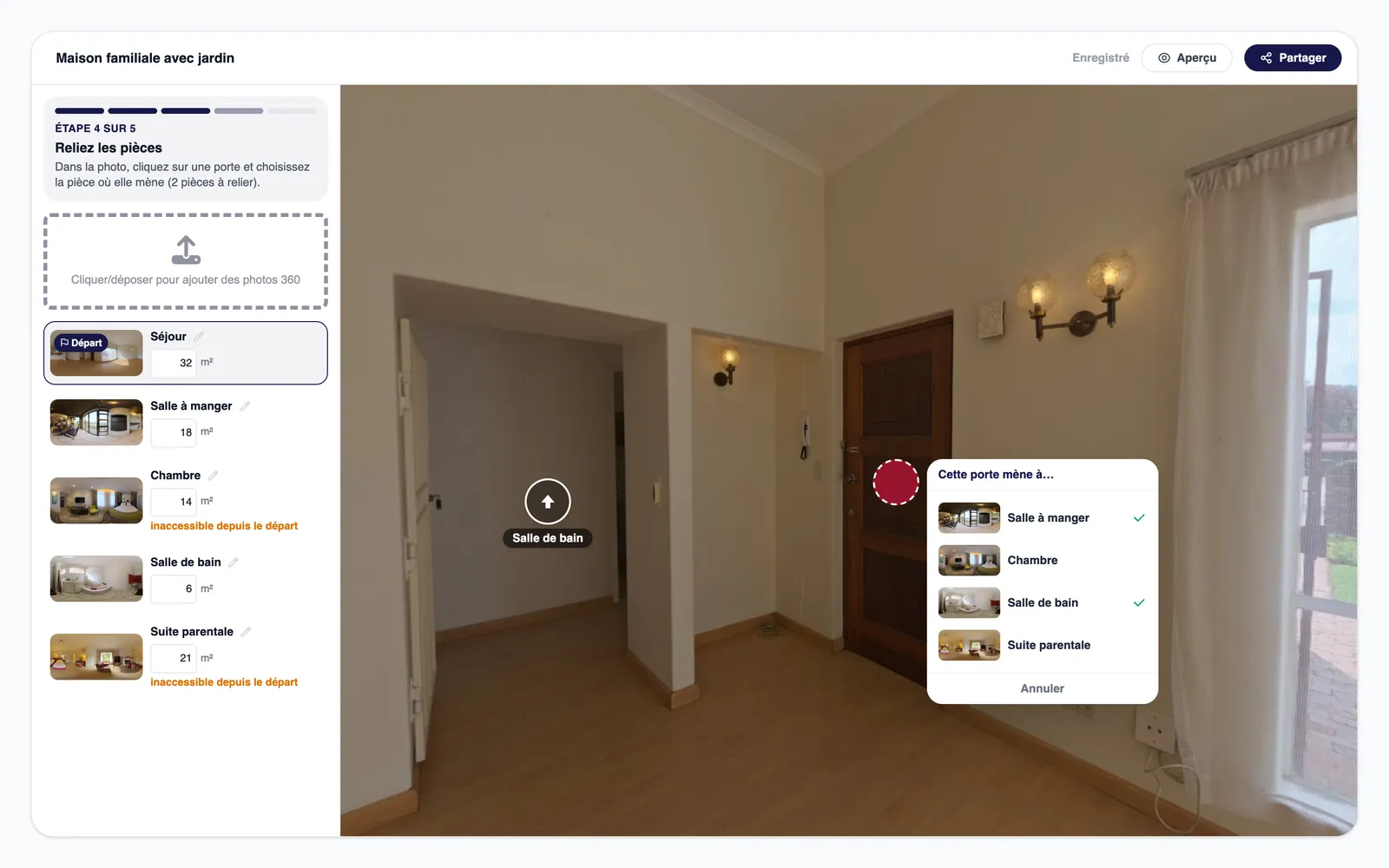
Before sharing, walk through the tour yourself on your phone, the way a buyer would. That is where you catch an unlinked door or a mislabeled room.
Making an Interactive Floor Plan Without a 360 Camera
The interactive floor plan is built from what you already have: the property's 2D floor plan and the listing photos.
- Open the property's floor plan in Interactive Floor Plan mode.
- Place the cameras. Click the plan where you took each photo, then point the camera in the direction of the shot.
- Pick the media. For each camera, a photo or a video of the property; the picker opens straight on the property's media.
- Share the link. It follows every change to the plan.
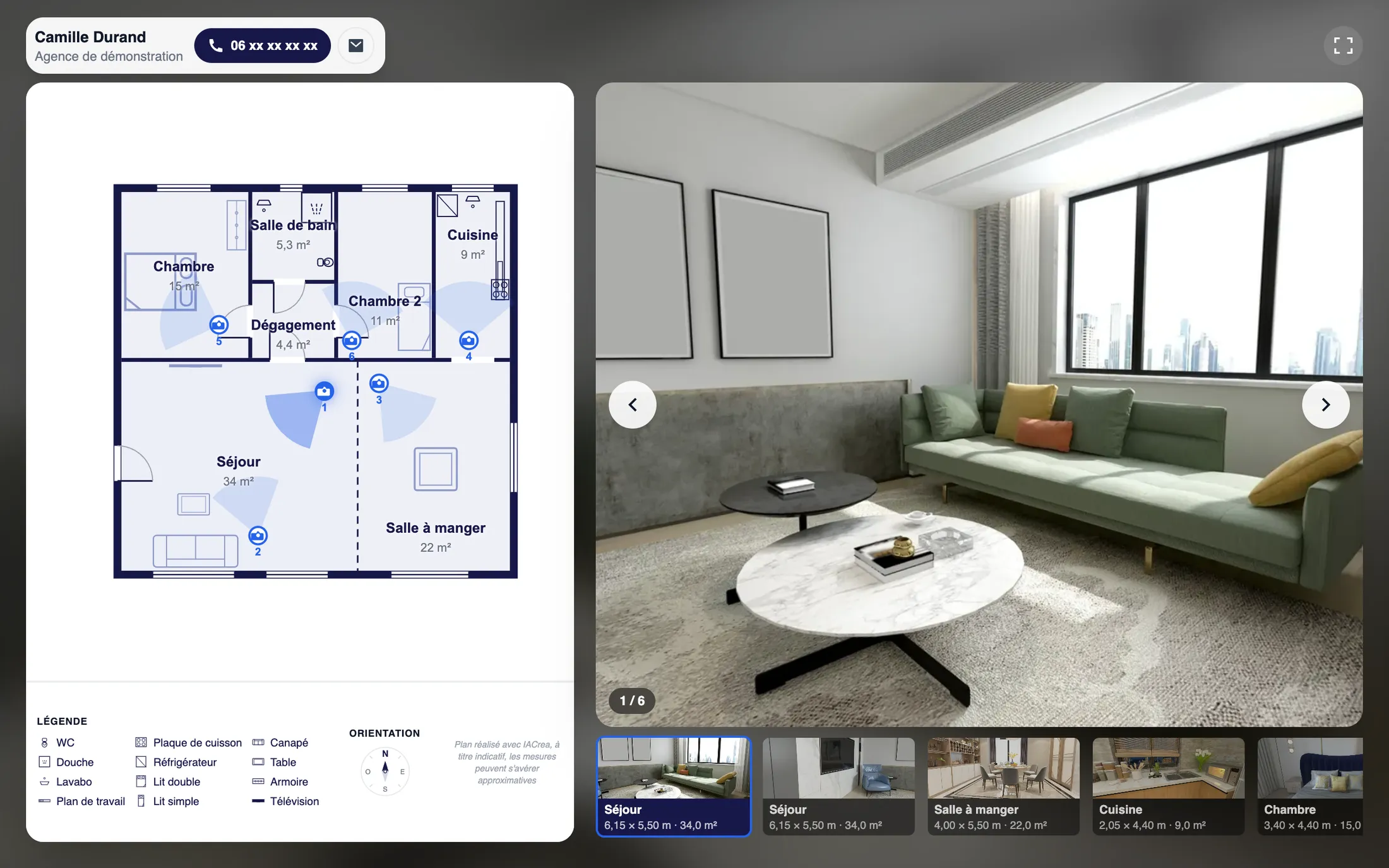
A field tip: shoot each room from the doorway, looking in. On the plan, the cameras then sit naturally at each entrance, and the buyer tours the home in the direction they would walk in.
Sharing the Tour: Short Link, QR Code, Embed Code
Every published tour gets three ways to reach buyers.
- A short, permanent link to paste into a listing or send by text. It always shows the latest saved version, and you can turn it off at any time, for example once the home has sold.
- A QR code for the yard sign, the window display or your real estate flyer.
- An embed code to paste into the property page on your brokerage's website: the tour displays right there.
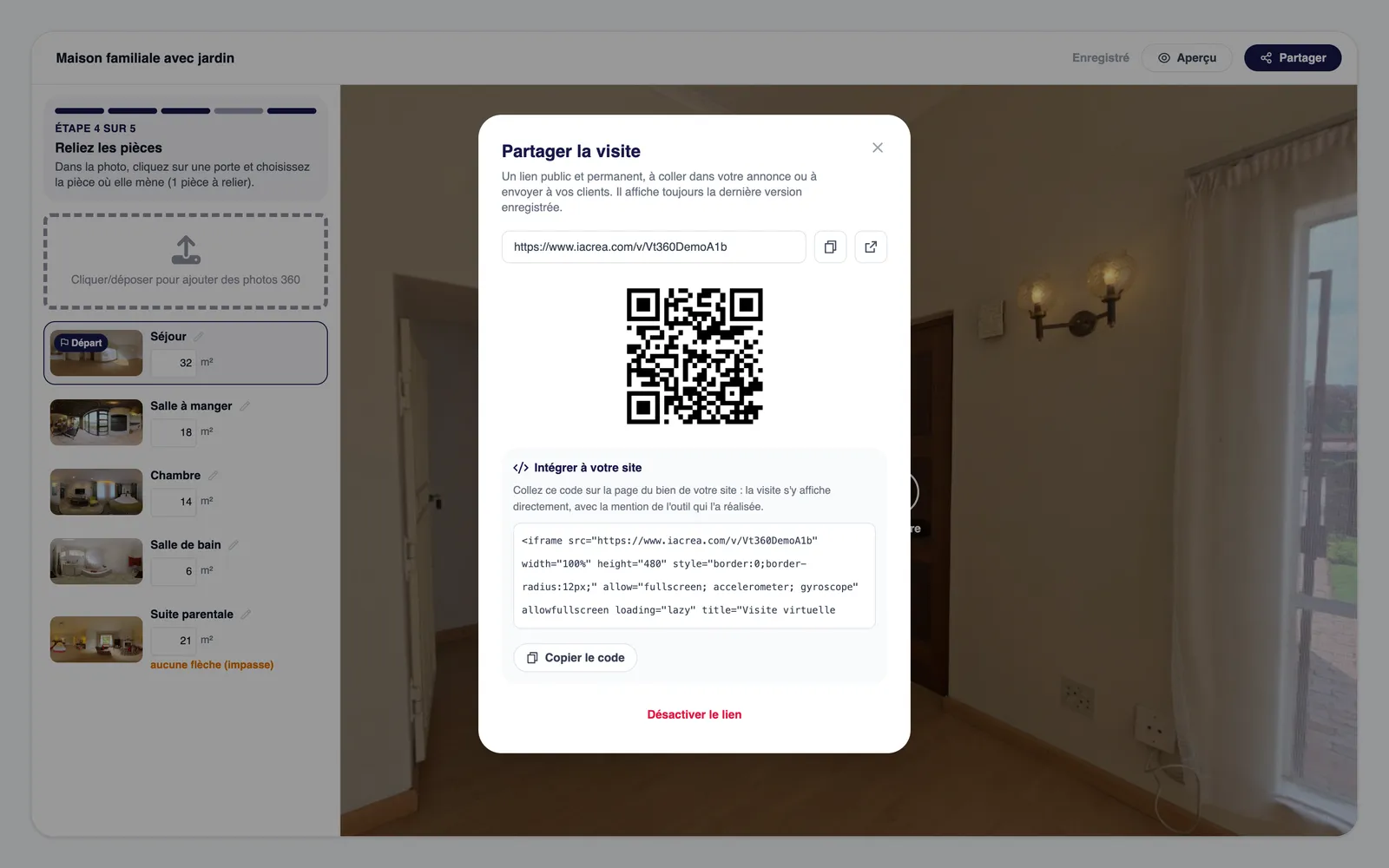
Buyers open the tour in their browser, with no account and no app. They see your contact details throughout. They never see the exact address or the price: you stay in control of that information.
Getting the Tour Into the Listing and the Listing Appointment
A tour nobody opens does nothing. Three places matter more than the others.
The MLS and listing portals. Most MLSs have a dedicated virtual tour field. Rules for it vary by board: some accept only unbranded tours there, while others have dropped that requirement, as Canopy MLS did in 2024. An IACrea tour shows your contact details, so check your MLS rules before pasting the link. If it does not fit there, send it at first contact.
Your reply to the first inquiry. This is when the tour pays off most. The buyer who asks "is the kitchen closed off?" gets the link, walks through the home and comes back with a showing request, or does not come back. Either way, you have saved time.
The listing appointment. Open a published tour on your phone in front of the seller. They see how their home will be presented, and that is one more argument against an agent who only offers photos.
The Limits of "Free"
"Free" deserves some fine print, so here it is.
- The 360° tour is free during the launch period. Creating, editing and sharing it uses no credits, even on a free account. It will become a paid feature when the launch offer ends; tours created before then will stay online.
- The 360 camera is a purchase. It is an upfront cost, spread over every listing you shoot afterward.
- The interactive floor plan uses no credits, but it requires a floor plan made with the 2D floor plan add-on, which is paid. Its price is on the pricing page.
- Your time is still yours. Plan on a few minutes per room on site, then a few minutes of setup. It is not much, but it belongs in your shoot-day schedule.
FAQ
Can you make a virtual tour for free? Yes, with two caveats. In IACrea, the 360° tour is free during the launch period: creating, editing and sharing it uses no credits, even on a free account. It will become a paid feature when the launch offer ends, and tours created before then will stay online. You do need a 360 camera, which is a one-time purchase.
How do you make a virtual tour without a 360 camera? With an interactive floor plan. It uses the regular listing photos, placed on the property's 2D floor plan where each one was taken. It uses no credits, but it requires a floor plan made with the 2D floor plan add-on, which is paid.
What photo format does a 360° tour need? An equirectangular photo with a 2:1 aspect ratio, meaning twice as wide as it is tall, at least 2,048 pixels wide, in JPEG, PNG or WebP. That is the standard export format of consumer 360 cameras.
How long does it take to make a virtual tour? Plan on one shot per room, which means a few minutes on site for a two-bedroom condo, then a few minutes in the editor to link the rooms and publish. The interactive floor plan needs no extra trip to the property if the photos and floor plan already exist.
Do buyers need to install an app to view the tour? No. The tour opens in the browser on a phone, tablet or computer, with no account and no app. You share it with a short link, a QR code or an embed code for your website.
Conclusion
How to make a virtual tour comes down to three decisions: the format that fits the property, clean shots room by room, and a link placed where buyers will see it. The 360° tour shows the atmosphere, the interactive floor plan shows the layout, and both are shared the same way. For your next listing, create your first virtual tour with IACrea: it is free throughout the launch period.
About the author

Co-founder & CEO of IACrea
Pauline Clavelloux is co-founder and CEO of IACrea. In daily contact with real estate agencies and agents, she understands their challenges around visibility, marketing and lead generation. On the blog, she shares actionable strategies on real estate marketing, social media and prospecting in the age of AI.
Related articles
Ready to turn your photos into content that sells?
Join thousands of real estate agents using IACrea to create professional content in seconds.
Try for free →