Real estate virtual tours, in 360° or on the floor plan
Buyers tour the home before they ever drive over. Two formats, built right from the listing: a 360° tour with your camera, or an interactive floor plan with the photos you already have. Share a link, a QR code or embed it on your website.
Interactive floor planYour usual photos, plus a floor plan made with any iPhone or drawn in IACrea
What buyers see
360° tourEvery room in full 360°
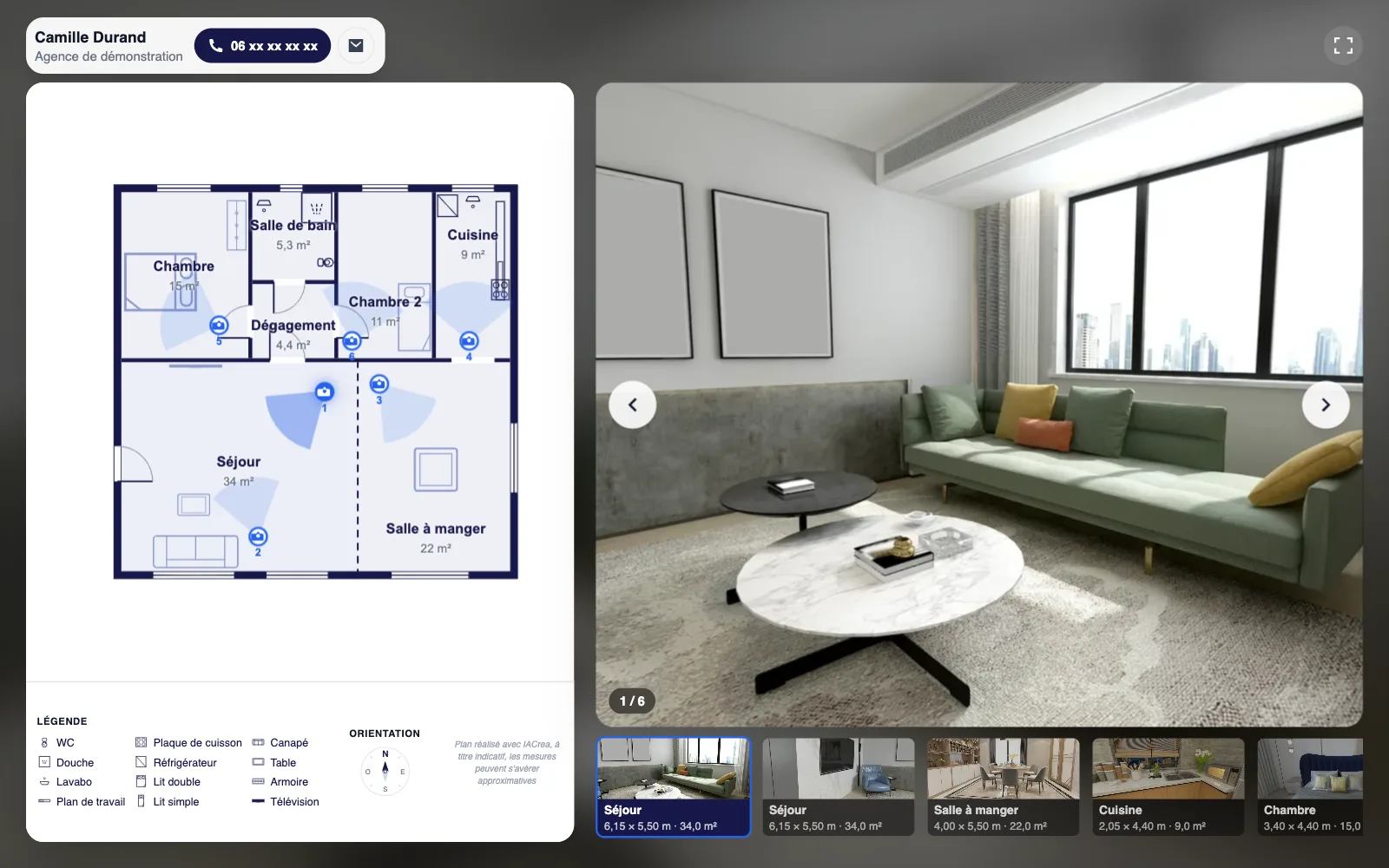
Interactive floor planThe whole floor plan, then the photo from each viewpoint
What they grasp best
360° tourThe feel, the volume, the light
Interactive floor planThe layout and how the rooms connect
At the property
360° tourOne 360° photo from the center of each room
Interactive floor planNothing extra: your listing photos are enough
Sharing
360° tourShort link, QR code, website embed
Interactive floor planShort link, QR code, website embed
For buyers
360° tourNo app, no account, on phone or computer
Interactive floor planNo app, no account, on phone or computer
360° tour
Build a 360° virtual tour in four steps, no software to install
Everything happens in your browser, right in the listing. A step-by-step guide always shows you what to do next.
01
Shoot every room
One 360 photo from the middle of each room, camera on a tripod, doors open, in natural light.
02
Upload the photos
Drag the camera's JPEG files into the editor. Photos are sorted in the order they were taken.
03
Link the rooms
Pick the starting room, then click each door and choose the room it leads to. The way back is suggested for you.
04
Share the tour
A short link and its QR code for your listings, or a snippet to paste on the listing page of your website.
Pick the starting room
Right after the upload, the editor asks which room the tour starts in. The guide tracks your progress.
Click on a door
One click on the door, one pick in the room list: the arrow is placed. Name each room and add its floor area.
The tour, as buyers see it
Buyers move from room to room by clicking the arrows. Your contact details stay on screen: they can call you in one tap.
Share and embed
A short, permanent link, a QR code, and an embed code to show the tour right on your website.
A tour that opens anywhere, no app needed
Buyers open the link on their phone, tablet or computer: the tour starts in the browser, full screen when the device allows it.
Short, permanent link you can switch off anytime
QR code ready for window displays and flyers
Embed code for your brokerage website
Your contact details at the top of the tour
Floor area of each room on the thumbnails
No address or price in the tour
Interactive floor plan
The interactive floor plan: your listing photos, placed on the plan
No 360 camera, no extra trip to the property: you start from the floor plan and the photos you already have.
01
The floor plan
Walk through the home with your iPhone and the IACrea app draws the floor plan. On an iPhone Pro, the LiDAR scan also captures the measurements. You can also draw the plan in the editor. Either way, you need the 2D Floor Plan add-on.
02
Place the cameras
In Interactive Floor Plan mode, click the plan where you took each photo, then point the camera the way you shot it.
03
Pick the media
Give each camera a photo or a video of the property. The picker opens straight to the listing's media.
04
Share the link
Short link, QR code and embed code for your website. The link always shows your latest edits.
The interactive floor plan, as buyers see it
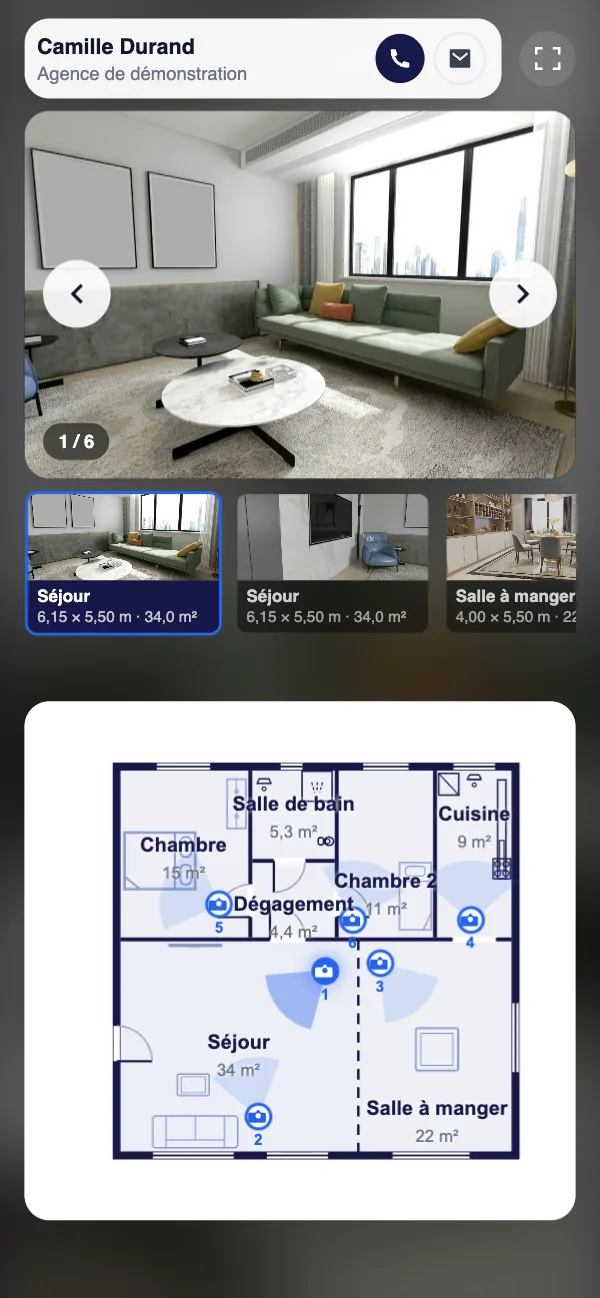
Buyers click a camera and the photo opens next to the plan, with the room name. Your contact details stay on screen.
On any phone, no app needed
Buyers open the link on a phone, tablet or computer. The plan fits the screen: they tap a camera and the room appears.
A real estate virtual tour lets buyers explore a home online before they visit. It comes in two forms: the 360° tour, a series of panoramic photos linked together where buyers look all around each room; and the interactive floor plan, where the floor plan acts as a map and each viewpoint opens a photo.
Both work around the clock, on a phone or a computer, with no app. For your business, it's one more asset in the listing, next to the photos, the floor plan and the video.
How to create a virtual tour of a house or apartment
For a 360° tour, take one 360 photo from the center of each room, camera on a tripod at eye level, doors open and in natural light. In IACrea, upload the photos, pick the starting room, then click each door to set the room it leads to. A tour can include up to 60 rooms.
For an interactive floor plan, start from the home's 2D floor plan. Open it in Interactive Floor Plan mode, click the plan where you took each photo, point the camera and pick the photo or video from the listing's media.
Either way, publish to get the share link, its QR code and the embed code.
Can you make a virtual tour without a 360 camera?
Yes, with an interactive floor plan. It only uses regular photos, the ones in your listing, placed on the floor plan where they were taken. Buyers don't spin around like in a 360° tour, but they see how the rooms connect, which photos alone never show.
Any recent iPhone can make the floor plan with the 2D Floor Plan add-on: walk through the home and the IACrea app draws it. On an iPhone Pro, the LiDAR scan also captures the measurements in about 5 minutes; on other iPhones, the plan shows the shape and proportions of the rooms, without dimensions. You can also draw it in the IACrea floor plan editor. For a 360° tour, any camera that exports equirectangular photos in a 2:1 format works (RICOH THETA, Insta360…).
Sharing the tour: listing, QR code and your website
Every published tour gets a short, permanent link to paste into your listing, send by text or email, or print as a QR code. The link always shows the latest saved version, and you can turn it off at any time.
For your website, IACrea gives you an embed code: the tour appears right on the listing page. Buyers see your contact details, never the street address or the price.
Why offer virtual tours to your buyers
A virtual tour lets buyers understand the layout before they visit: showings are better prepared, and the ones that would have gone nowhere don't happen. Out-of-town buyers get a clear picture of the home without making the trip.
For sellers, it's a strong point in your listing presentation: their home will be marketed with an online tour, on top of the photos.
Virtual tours and virtual staging
An empty room looks smaller in 360°. IACrea's virtual staging furnishes an equirectangular 360° photo in the style of your choice, to help buyers picture themselves in it.
Paired with the home's 2D floor plan, the virtual tour gives buyers both the layout of the rooms and their feel.
Customer reviews on IACrea
What our customers say after using IACrea
4.6/5 on Google· 10,000+ users since 2023
Thank you, IACrea, for letting us create top-quality images so quickly and so easily! I recommend it with as much enthusiasm as the results deserve. It's awesome!
Florence Edouard
More than a tool, a real revolution. I've been impressed since IACrea's early days. New features every month, a team that listens to its customers… In short, THE benchmark for virtual staging, and I'd even say for photo editing. Bravo!
Jérémy Perez
Good software. A small hiccup at the start, but Pauline fixed it brilliantly. I recommend it 100%. Emmanuel SZABO
Not necessarily. A 360° tour takes a consumer 360 camera (RICOH THETA, Insta360…) on a tripod. An interactive floor plan uses the regular photos from your listing, placed on the home's 2D floor plan.
What's the difference between a 360° tour and an interactive floor plan?
A 360° tour puts buyers inside each room, where they look all around. An interactive floor plan shows them the whole plan, then the photo from each viewpoint when they click a camera. The first conveys the feel of the home, the second explains the layout. You can offer both for the same listing.
Which 360 photo formats are supported?
Equirectangular photos in a 2:1 format (twice as wide as they are tall), at least 2,048 pixels wide, in JPEG, PNG or WebP. That's the export format of common 360 cameras.
How many rooms can a 360° tour include?
Up to 60 rooms per tour. You can create several tours for the same listing, for example one per floor.
How do I share the virtual tour with buyers?
Publish the tour to get a short, permanent link with its QR code. Paste it into your listings, send it by text or email, or print the QR code. You can turn the link off at any time.
Can I embed the virtual tour on my website?
Yes. The share window gives you an embed code to paste into the listing page: the tour appears right there, with full screen available.
Does the street address or the price show up in the tour?
No. The tour shows the rooms and your contact details. Never the street address or the price.
Do buyers need to install an app?
No. The tour opens in the browser, on a phone, tablet or computer, with no account and no app.
Can I furnish an empty room in a virtual tour?
IACrea's virtual staging furnishes and decorates an equirectangular 360° photo in the style you choose, with no new shoot.
Are virtual tours free?
The 360° tour is free during the launch period: creating, editing and sharing a tour uses no credits, even on a free account. It will become a paid feature when the launch offer ends; tours created before then stay online. The interactive floor plan uses no credits either, but it needs a floor plan of the home, created with the 2D Floor Plan add-on.

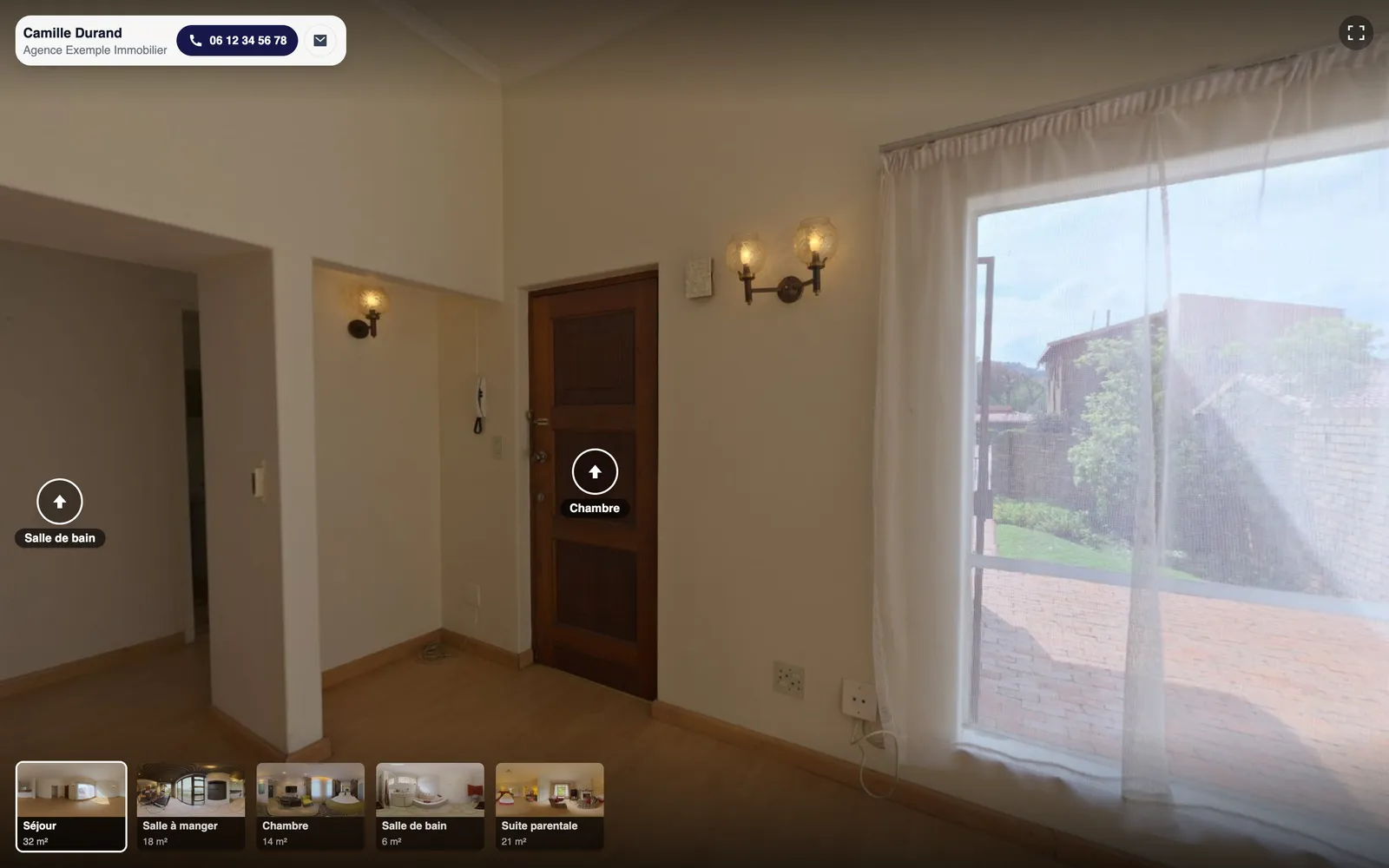 Full 360° immersion


Build a 360° virtual tour in four steps, no software to install
Everything happens in your browser, right in the listing. A step-by-step guide always shows you what to do next.
Shoot every room
One 360 photo from the middle of each room, camera on a tripod, doors open, in natural light.
Upload the photos
Drag the camera's JPEG files into the editor. Photos are sorted in the order they were taken.
Link the rooms
Pick the starting room, then click each door and choose the room it leads to. The way back is suggested for you.
Share the tour
A short link and its QR code for your listings, or a snippet to paste on the listing page of your website.
Pick the starting room
Right after the upload, the editor asks which room the tour starts in. The guide tracks your progress.
Click on a door
One click on the door, one pick in the room list: the arrow is placed. Name each room and add its floor area.
The tour, as buyers see it
Buyers move from room to room by clicking the arrows. Your contact details stay on screen: they can call you in one tap.
Share and embed
A short, permanent link, a QR code, and an embed code to show the tour right on your website.
A tour that opens anywhere, no app needed
Buyers open the link on their phone, tablet or computer: the tour starts in the browser, full screen when the device allows it.