RENT trade show, Nov. 4-5: booth SD06Meet IACrea at the RENT trade show on November 4-5, 2026, at Paris Expo Porte de Versailles, booth SD06
IACrea Feature
Interactive floor plan: buyers click the plan, they see the room
Place your listing photos on the floor plan, right where you took them. Buyers see how the home flows, find every room in its place on the plan, then call you. No 360 camera, no second trip to the property.
“Wait, where's the bedroom?” Listing photos never say where they were taken
Three things buyers can't find in your listing:
01
The order of the rooms: fifteen photos scroll by with nothing to tie them together
02
Where each photo was taken: the floor plan sits at the bottom of the listing, and nobody connects the two
03
Where each room sits: a photo shows a living room, not what's next to it
An interactive floor plan brings the plan and the photos together, using what you already have.
How it works
From floor plan and photos to a shareable link in minutes
It all happens in the IACrea floor plan editor, right from the listing. No extra trip to the property, no extra gear.
01
The floor plan
Walk through the home with your iPhone and the IACrea app draws the floor plan. On an iPhone Pro, the LiDAR scan also captures the measurements. You can also draw the plan in the editor. Either way, you need the 2D Floor Plan add-on.
02
Place the cameras
In Interactive Floor Plan mode, click the plan where you took each photo, then point the camera the way you shot it.
03
Pick the media
Give each camera a photo or a video of the property. The picker opens straight to the listing's media.
04
Share the link
Short link, QR code and embed code for your website. The link always shows your latest edits.
The interactive floor plan, as buyers see it
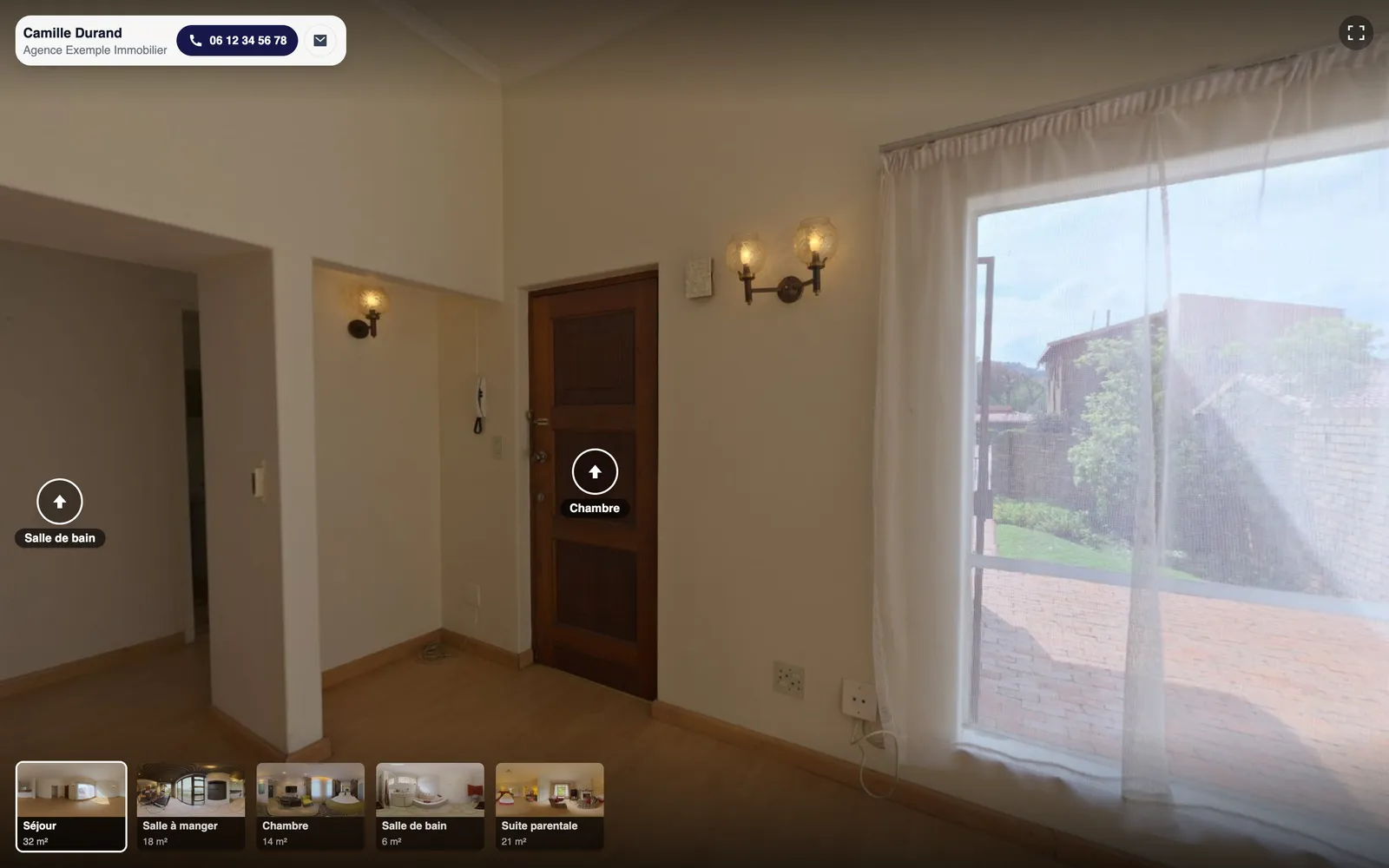
Buyers click a camera and the photo opens next to the plan, with the room name. Your contact details stay on screen.
On any phone, no app needed
Buyers open the link on a phone, tablet or computer. The plan fits the screen: they tap a camera and the room appears.
Photos and videos on the same plan
Room name with every photo
Your contact details at the top
No street address, no price
The link always shows your latest edits
Turn the link off anytime
For your listings
What an interactive floor plan changes for your buyers, and for you
Showings that go somewhere
Buyers already know the layout. When they ask for a showing, it's because the floor plan works for them.
Out-of-town buyers
They walk through the home room by room from their couch, plan in front of them, and only travel to see it in person.
A listing presentation edge
Show the demo to the seller: their home will come with a floor plan buyers can explore, not a static image at the bottom of the listing.
Leads that come to you
Your contact details stay at the top of the plan: one tap and the buyer calls or emails you.
Everywhere you market
The link in your listing and your messages, the QR code on yard signs and flyers, the plan embedded on your website's listing page.
Always up to date
Fix a wall or swap a photo and the link shows the new version right away. Home sold? Turn the link off.
For standout homes and large spaces, a 360° virtual tour puts buyers in the middle of every room. You build it from the same listing and share it the same way.
An interactive floor plan is a 2D floor plan of a home with viewpoints placed on it: cameras set where each photo was taken and pointed the way it was shot. Buyers click a camera and see the photo, with the room name.
It's a form of virtual tour that needs no 360 camera and no extra visit to the property. It connects what a listing usually keeps apart: the floor plan at the bottom of the page and the photos at the top.
How to create an interactive floor plan for a listing
Start with the floor plan. The IACrea app draws it as you walk through the home, on any recent iPhone: on an iPhone Pro, the LiDAR scan also captures the measurements in about 5 minutes; on other models, the plan shows the shape and proportions of the rooms, without dimensions. You can also draw it in the floor plan editor. Either way, you need the 2D Floor Plan add-on.
Then open the plan in Interactive Floor Plan mode. Click the spot where you took a photo, point the camera, and pick the photo or video from the listing's media. Repeat for each viewpoint, then publish: you get the link, its QR code and the embed code.
Interactive floor plan or 360° virtual tour: which one should you use?
A 360° virtual tour puts buyers in the middle of every room. It's ideal for conveying the feel of a standout home, and it takes a 360 camera and one panoramic photo per room.
An interactive floor plan shows the layout first, then each room. You make it with your listing photos and no extra gear. Both are built in IACrea from the same listing, and nothing stops you from offering both.
Do you need an iPhone Pro to make an interactive floor plan?
No. Any recent iPhone can make the floor plan: you walk through the home and the IACrea app draws it. An iPhone Pro (iPhone 12 Pro or later, thanks to its LiDAR sensor) also captures the measurements: wall dimensions and room sizes. On other iPhones, the plan shows the shape and proportions, without dimensions or room sizes. You can also draw the plan in the IACrea web editor. Either way, you need the 2D Floor Plan add-on.
The photos can come from anywhere: a camera, a phone, or photos you already edited in IACrea.
Where to share your interactive floor plan
Paste the short link into your listing description and your messages to buyers, and print the QR code on yard signs and flyers. On your website, the embed code displays the interactive floor plan right on the listing page.
It opens in the browser, on a phone or a computer, with no app and no account. Buyers see your contact details, the listing title and the city, never the street address or the price.
Are the dimensions on an interactive floor plan official measurements?
No. The room sizes and dimensions on a LiDAR-scanned floor plan are approximate: they help buyers picture each room. A plan made without LiDAR shows no dimensions or room sizes at all. Neither replaces an official measurement of the home's square footage, such as the one done by an appraiser.
Customer reviews on IACrea
What our customers say after using IACrea
4.6/5 on Google· 10,000+ users since 2023
Thank you, IACrea, for letting us create top-quality images so quickly and so easily! I recommend it with as much enthusiasm as the results deserve. It's awesome!
Florence Edouard
More than a tool, a real revolution. I've been impressed since IACrea's early days. New features every month, a team that listens to its customers… In short, THE benchmark for virtual staging, and I'd even say for photo editing. Bravo!
Jérémy Perez
Good software. A small hiccup at the start, but Pauline fixed it brilliantly. I recommend it 100%. Emmanuel SZABO
It's the 2D floor plan of a home with cameras placed where you took your photos. Buyers click a camera and see the photo or video of that room, in its place on the plan.
Do I need a 360 camera?
No. An interactive floor plan uses regular photos, the ones in your listing. If you have a 360 camera, the 360° virtual tour is the other format IACrea offers.
Do I need an iPhone Pro?
No. Any recent iPhone can make the floor plan with the IACrea app: an iPhone Pro also captures the measurements with its LiDAR sensor, other models give you the shape and proportions, without dimensions. You can also draw the plan in the editor. Either way, you need the 2D Floor Plan add-on.
Can I add videos to the floor plan?
Yes. Each camera opens a photo or a video of the property, your choice.
Does the link change when I edit the floor plan?
No. The link stays the same and always shows the latest saved version of the plan and its cameras. You can turn it off at any time.
Can I embed the interactive floor plan on my website?
Yes. The share window gives you an embed code to paste into the listing page, along with the short link and the QR code.
Does the street address or the price show up?
No. Buyers see the listing title, the city, the floor plan, the photos and your contact details. Never the street address or the price.
How much does the interactive floor plan cost?
The interactive floor plan uses no credits: all it needs is a floor plan of the property, created with the 2D Floor Plan add-on. Until you have a paid subscription, the link carries the IACrea badge.



From floor plan and photos to a shareable link in minutes
It all happens in the IACrea floor plan editor, right from the listing. No extra trip to the property, no extra gear.
The floor plan
Walk through the home with your iPhone and the IACrea app draws the floor plan. On an iPhone Pro, the LiDAR scan also captures the measurements. You can also draw the plan in the editor. Either way, you need the 2D Floor Plan add-on.
Place the cameras
In Interactive Floor Plan mode, click the plan where you took each photo, then point the camera the way you shot it.
Pick the media
Give each camera a photo or a video of the property. The picker opens straight to the listing's media.
Share the link
Short link, QR code and embed code for your website. The link always shows your latest edits.
The interactive floor plan, as buyers see it
Buyers click a camera and the photo opens next to the plan, with the room name. Your contact details stay on screen.
On any phone, no app needed
Buyers open the link on a phone, tablet or computer. The plan fits the screen: they tap a camera and the room appears.